ezClocker: Employee Time Track
- 4.6
- Rating
- 100.00K
- Installs
- Free
- Price

 Analysis by App-foxy
Managing hourly staff sounds simple until a business has to answer everyday questions: Who arrived, when did a shift actually begin, and which schedule is current? I found ezClocker: Employee Time Track most useful as a focused way to bring those details into one place. It is a business app from ezNova Technologies DBA ezClocker, built around employee time tracking, shift planning, and GPS verification rather than a crowded collection of unrelated tools.
That focus matters for small teams. A shop owner, cleaning service, contractor, or local office may not need a full workforce-management platform. They may need something employees can understand quickly and a manager can check without chasing messages. My overall impression is that ezClocker fits that middle ground well, although its value depends heavily on whether every worker can comfortably use a smartphone during the working day and whether the business is happy to make location verification part of its attendance process.
How the app feels to read and navigate
The first strength I noticed is that the purpose is easy to understand. This is not an app that makes you learn a complicated project-management system before recording a shift. The main idea stays visible: employees track working time, managers organize shifts, and GPS information can help verify where clock-in activity happened. That clear scope is especially helpful for people who are not confident with business software.
You May Also Like

 Blood Strike: 2.5 Anniversary
Blood Strike’s Loadouts Turn Every Drop Into a Tactical Gamble
A close look at Blood Strike’s custom loadouts: how fast access to signature weapons reshapes its battle royale rhythm, rewards preparation, and narrows the gap between fights.

 Pandora - Music & Podcasts
Pandora’s Music Is Easy to Start, but Harder to Recover
Pandora’s strength is its low-effort path from a seed to a station. Its weak spot is how much confidence it asks you to place in connection, setup, and quiet recovery.

 8 Ball Pool
8 Ball Pool Is Built on Rivalries, Rematches, and Routine
A close look at the rivalries, rematches, shared routines, and unanswered safety questions that turn a quick pool match into a persistent mobile community.

 Samsung Music
Samsung Music’s Quiet Strength Is Playing What You Already Own
Its reach comes less from spectacle than from dependable access to a personal library. That simplicity is both the app’s strongest retention engine and its ceiling.

 AccuWeather: Weather Radar
AccuWeather Review: A Quick, Clear Forecast for Everyday Decisions
For everyday plans, the best forecast is the one you can understand quickly. AccuWeather makes rain timing, radar, and local conditions easy to act on, with a few trade-offs.

 Hill Climb Racing
Why Hill Climb Racing Still Turns Crashes Into One More Run
A tiny car, a bumpy hill and one more upgrade: Hill Climb Racing keeps resurfacing because its simple chaos makes every near-miss feel personal.
More From Our News Desk



For a manager, the most useful mental model is to separate the app into three jobs. Scheduling answers what should happen, time tracking records what did happen, and GPS verification adds context to a clock-in or clock-out. Thinking about those jobs separately prevents a common mistake: treating a planned shift as proof that someone worked every minute of it. I would still review unusual entries instead of accepting a schedule as an automatic timesheet.
The interface is likely to feel most comfortable to people who prefer direct labels and routine actions. A worker generally wants one obvious decision at the beginning of a shift and another at the end. A manager, meanwhile, needs a broader view of schedules and recorded hours. That difference is important when introducing the app to a team: train employees around their two daily actions, but train supervisors around checking and correcting records.
Readability is also a workflow issue, not just a visual one. A busy manager opening the app between customer conversations needs to recognize the relevant employee, date, shift, and status without interpreting a dense report. I recommend setting up a short trial with real staff names and a typical week before rolling it out. That reveals whether the schedule is understandable to your team and whether the person approving hours can find exceptions quickly.
The app has earned a 4.6 average from around 6.3 thousand ratings, and it has passed 100 thousand installs. Those figures suggest that the straightforward time-tracking idea resonates with a meaningful number of users, but they should not replace a practical test with your own workforce. A rating cannot tell you whether a particular employee has difficulty reading small interface text, remembering a multi-step routine, or using location-based tools in a noisy workplace.
Making the routine easier for different readers
I would introduce ezClocker with a printed or spoken routine that uses the same words as the app: open the app, choose the work action, confirm the entry, and repeat when leaving. Avoid explaining every management option to a new employee. Too much information at the start can make a simple task feel more difficult, especially for workers who use English as a second language or who are unfamiliar with digital time clocks.
Managers should also decide how they will handle corrections before the first real pay period. If someone forgets to clock out, the important question is not only whether the record can be reviewed, but who is responsible for checking it and how the employee reports the mistake. A clear internal rule reduces pressure on workers who may not feel comfortable navigating an unfamiliar screen to solve an error themselves.
The current version is 3.27.1, and the app supports Android 7.0 or later. That makes it relevant to organizations using a mixture of newer and older Android phones, though I would still test the exact devices your staff carry. A minimum operating-system requirement is only one part of usability; screen size, battery condition, connectivity, and the employee’s comfort with the phone can matter just as much during a rushed shift.
Motor, sensory, and cognitive considerations
Time tracking is often performed at inconvenient moments: while entering a building, carrying supplies, standing outside a customer’s property, or moving between jobs. That makes physical interaction important. A worker who has limited dexterity, hand tremors, temporary injuries, or difficulty using a small touchscreen may find a phone-based clock-in less comfortable than a shared kiosk, a desktop station, or a process supported by a supervisor.
For that reason, I would not judge accessibility only by how the app looks while sitting at a desk. Ask whether an employee can use it with one hand, in bright sunlight, while wearing gloves, or after walking across a noisy worksite. These are practical barriers rather than abstract ones. If the action requires careful tapping at exactly the right moment, the business should provide a reasonable backup procedure instead of treating every failed attempt as employee error.
Workers with low vision may prefer a larger device, increased system text, or operating-system assistance tools where those tools work with the app. I would verify this directly on the phones used by the team, because support can vary with device settings and Android versions. The same applies to employees who rely on screen readers or other assistive technologies: a short hands-on test is more useful than assuming that a simple interface is automatically accessible.
Color and visual status can also affect comprehension. If a worker has color-vision differences, do not make a color change the only indication that a shift has started or ended. Teach the expected confirmation wording or action as well, and ask the employee to demonstrate the routine. This is a small training choice, but it can prevent uncertainty when the screen is hard to read or the phone is being used outdoors.
For employees with memory difficulties, the best approach is consistency. Keep the clock-in routine tied to a physical habit, such as completing it immediately after entering the workplace. Supervisors can reinforce the same sequence rather than giving changing instructions. ezClocker can support a structured routine, but it cannot by itself solve every cognitive demand involved in remembering schedules, locations, and end-of-shift actions.
GPS verification and personal comfort
GPS verification is one of the app’s most distinctive ideas, but it is also where inclusion and privacy concerns meet. It can help a manager distinguish a clock-in made at an expected work location from one made elsewhere. That is useful for mobile teams, yet a location check may feel intrusive to employees, particularly those who work across multiple sites or have limited control over where they begin and finish a shift.
I would explain the purpose in plain language before asking staff to rely on it. Employees should understand when location information is relevant to the time record and whom to contact if a legitimate clock-in does not match expectations. A worker who has poor location accuracy, a phone problem, or a job that starts in an unusual place should not be forced into an argument with an automated record.
There is also a situational difference between office work and field work. In a fixed workplace, a shared clock or desktop process may be easier for some employees. In a cleaning business or repair service, individual phone tracking can be more practical because staff do not all begin at one central site. The same feature that improves accountability for one team may create friction for another.
Using it in real working situations
Consider a small landscaping crew with several employees moving between customer properties. The owner can prepare shifts in advance, while each worker records time from the relevant job area. At the end of the day, the owner has a more useful starting point for reviewing hours than a collection of text messages saying “finished.” The GPS element can add context when the team is spread out, but the owner still needs a process for weather delays, travel time, and jobs that change location.
Now compare that with a small café where everyone works in the same building. Scheduling and digital time records may still be helpful, but GPS verification may add less value than it does for a mobile crew. If employees already use a shared device reliably, an individual-phone workflow could be unnecessary. This is one of the clearest cases where another approach may be better: choose the simplest method that gives your business dependable records.
For a cleaning company, I see a more interesting trade-off. A supervisor can use planned shifts to coordinate several homes or offices, while employees use their own phones to record work. However, the business should define whether travel between locations counts as paid time and how a worker handles a customer who asks for extra work. The app can organize time information, but it should not be expected to decide employment rules or resolve disagreements about what the shift included.
For a contractor with irregular jobs, the schedule feature may be more valuable than a traditional fixed timetable. A manager can use it to communicate expected assignments, while actual clock records show how the day unfolded. The risk is that frequent last-minute changes make the schedule difficult to trust unless someone updates it promptly. In that environment, I would treat the schedule as a communication tool and the recorded time as the item requiring careful review.
One practical tip is to run a complete pay-cycle rehearsal before depending on the app. Create ordinary shifts, include one late arrival, simulate a missed clock-out, and test a worker who changes location. Then ask a manager who did not set up the account to find the relevant records. This uncovers confusing handoffs much earlier than a theoretical demonstration.
Where it beats ordinary alternatives
Compared with paper timesheets, ezClocker offers a more immediate record and can connect scheduled work with actual clock activity. Paper is familiar and can be useful when phones are unavailable, but it depends on handwriting, memory, and later data entry. That creates opportunities for missing details and makes same-day checking harder.
Compared with a shared spreadsheet, the app is more purpose-built for employee hours and shift routines. A spreadsheet can be flexible, especially for a manager who already has a carefully designed system, but it often requires more manual discipline. It is easy to overwrite a cell, use inconsistent time formats, or forget to update a schedule. ezClocker is the better fit when the business wants employees to perform a defined action rather than edit a document.
Compared with a full workforce platform, this app feels less intimidating and potentially easier for a small operation to adopt. The trade-off is that businesses needing deep payroll, human-resources, project-costing, or complex compliance workflows may outgrow a focused time tracker. I would not choose it simply because it is cheaper or simpler; I would choose it when its narrower job matches the business’s real problem.
The app is free to download, with in-app purchases ranging from five dollars to sixty dollars per item. That makes it easy to begin evaluating without committing to a purchase immediately, but managers should examine the plan that fits their team before building a process around it. A free starting point is useful for testing usability, not a guarantee that every desired management workflow will remain free.
Remaining barriers before a team adopts it
The biggest barrier is dependence on personal-device confidence. An employee may be excellent at the job and still struggle with app navigation, a damaged phone, low battery, or an unfamiliar operating system. If the business makes digital clocking the only acceptable route, those technical problems can become attendance disputes. A fair rollout needs a backup channel and a named person who can correct records.
Connectivity and location conditions deserve attention too. A phone may work perfectly in an office and behave differently in a basement, warehouse, rural property, or large building. GPS verification can be especially sensitive to the environment. Test the app at the actual places where people start shifts, not just in the manager’s office.
Another barrier is the social meaning of monitoring. Some teams will welcome location verification because it removes arguments about where a shift began. Others may interpret it as excessive surveillance. The feature should be introduced as a way to clarify work records, with clear boundaries and a human review process. If the business cannot explain why it needs that information, a simpler timekeeping method may be more respectful and just as effective.
Language, literacy, and cognitive load should be included in training rather than treated as afterthoughts. Demonstrate the workflow, let each employee practice, and ask them to explain what they would do after forgetting to clock out. This approach identifies misunderstandings without embarrassing anyone. It also gives managers a chance to simplify their own instructions before a real timesheet is affected.
Finally, businesses should be cautious about confusing recorded time with a complete payroll solution. ezClocker can make attendance information more organized, but a manager still has to review unusual entries, apply workplace policies, and transfer information into whatever payroll process the company uses. That human step is not a weakness unique to this app; it is a necessary safeguard whenever automated records influence pay.
My inclusive verdict
I recommend ezClocker for small and mobile teams that want a clear employee time tracker with shift scheduling and GPS verification, especially when paper records and informal messages are causing confusion. Its strongest quality is focus: it gives a business a practical place to organize expected shifts and compare them with actual work activity.
From an inclusive-use perspective, I would recommend it with conditions. Give employees a short, consistent routine; test the app on the devices and job sites they actually use; provide a backup for phone, connectivity, or motor difficulties; and explain the purpose of GPS verification before making it part of attendance expectations. Those steps matter more than simply telling staff to download the app.
People who need a shared physical clock, a highly specialized payroll suite, or a workflow that avoids individual phones may be happier with another option. Businesses that need a lightweight mobile record and can support different abilities through training and alternatives are more likely to appreciate this one. It is rated for Everyone, and the developer has kept the product accessible to a broad business audience, but accessibility in practice still depends on the workplace around it.
After using it as a focused business tool, I see ezClocker as a sensible starting point rather than an all-purpose workforce system. It can replace a surprising amount of paper and guesswork, but it works best when managers treat it as part of a fair attendance process, not as a substitute for communication. The best result comes from combining the app’s structure with human judgment.
FAQs for ezClocker: Employee Time Track
01What is ezClocker: Employee Time Track used for?
ezClocker is a time-tracking and employee scheduling app designed for small businesses, managers, and their teams. After setting up a company account, managers can create employee profiles, assign schedules, and review clock-in and clock-out activity. Employees can use the app to record working hours from their mobile devices, making it easier to organize attendance and prepare accurate timesheet information.
02How do employees clock in and clock out with ezClocker?
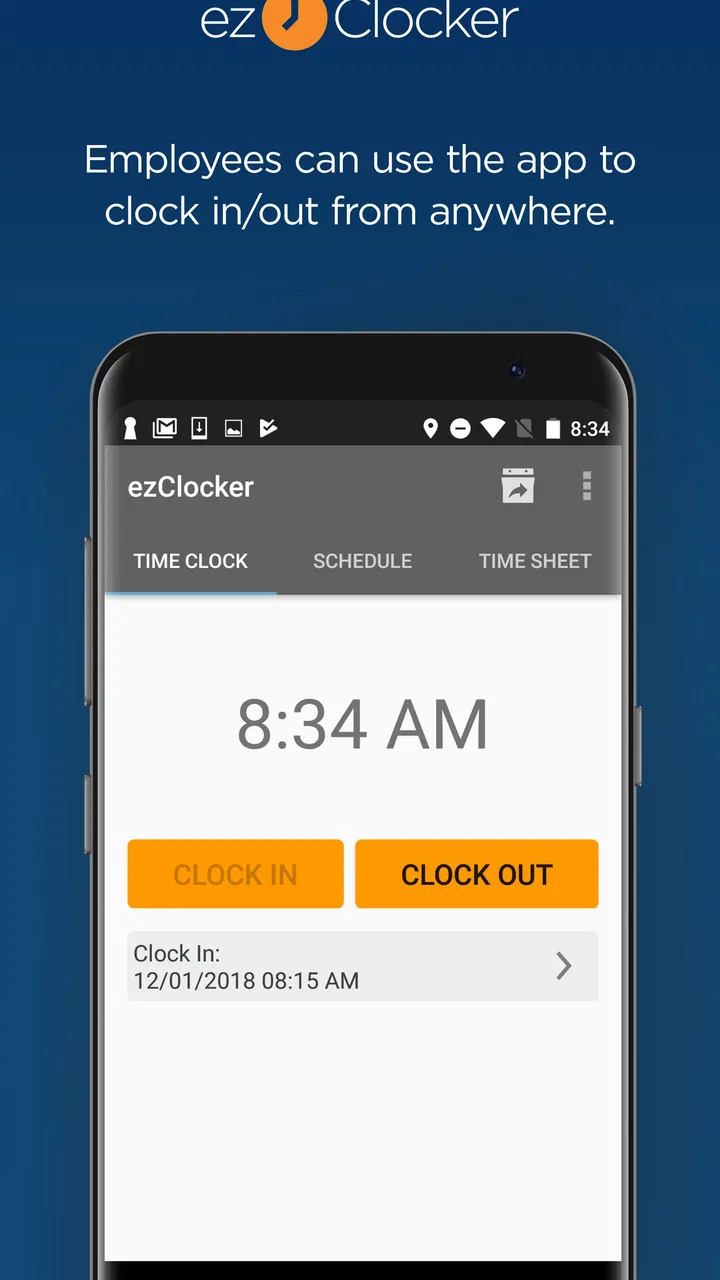
Employees generally clock in and out directly from the ezClocker mobile app using the account provided by their employer. Depending on the company’s configuration, the app may use location information to help verify where a time entry was created. Users should make sure their phone has a reliable internet connection, location permissions are enabled when required, and that they remember to end their shift properly to avoid incomplete or inaccurate records.
03Does ezClocker include employee scheduling and time-off management?
Yes, ezClocker offers features intended to help managers organize employee schedules and monitor availability. Managers can create shifts, assign them to team members, and review scheduled work alongside recorded hours. The app may also support time-off requests or related workforce management tools, depending on the selected plan and account settings. Businesses should check the current feature list before subscribing.
04Is ezClocker free to use, or does it require a subscription?
ezClocker may offer a trial period or limited access so businesses can evaluate its time-tracking tools before committing. Continued use of the full service generally depends on a paid subscription, with pricing potentially varying according to the number of employees, billing cycle, and included features. Because plans and promotions can change, review the latest pricing shown in the app or official store listing before downloading.
05Is ezClocker suitable for every type of business?
ezClocker can be useful for many small businesses that need straightforward employee time tracking, scheduling, and timesheet management, particularly teams with employees working in different locations. However, it may not replace a full payroll, accounting, or enterprise workforce platform for larger organizations with complex compliance and reporting requirements. Before adopting it, confirm that its integrations, permissions, location tools, and reporting options match your business needs.
Pros
- Simple clock-in and clock-out process for employees
- GPS location records can help verify where shifts begin and end
- Managers can review and edit timesheets from a central dashboard
- Supports multiple employees
- jobs
- and work locations
- Useful reminders help reduce missed clock-ins and clock-outs
Cons
- Some advanced features require a paid subscription
- Employees may have privacy concerns about location tracking
- Requires a stable internet connection for reliable syncing
- Limited payroll options compared with dedicated payroll platforms
- Setup can take time when configuring jobs
- users
- and permissions

ezClocker: Employee Time Track
Gallery